
THE CHALLENGE OF TEMPERATURE MEASUREMENT
How to measure temperature correctly?
In the first part of the DELTA Solutions series, we discussed all the factors that can make an object appear warmer or cooler than it really is compared to its surroundings. Emissivity, the efficiency with which something emits its thermal energy, and reflectivity, the degree to which an object reflects the thermal energy around it, are the main variables to consider. These are mainly determined by the material it is made of and the state of its surface.
However, emissivity and reflectivity not only influence how relatively warm or cold things look, but also determine whether temperature measurements are really accurate. Let's see what we need to adjust in the camera setup to obtain accurate temperature measurements.

APPARENT VS. ACTUAL TEMPERATURE
First, let's talk about what makes a camera radiometric, or the ability to measure temperatures. How do you measure temperature?
All thermal cameras are technically radiometers, i.e. they are sensitive to different radiation intensities; but radiometric cameras go one step further thanks to the factory calibration process they undergo. During the manufacturing process, radiometric cameras are pointed at a number of radiation sources. Each of these sources, called black bodies, is configured to produce an amount of energy corresponding to a specific temperature. Each of these sources is programmed into the camera to create what is called a calibration curve. This is the internal reference that the camera uses as the basis for its temperature calculations.

Radiometric thermal cameras provide the temperature of temperature of each pixel in the scene.
Now that we are working with a calibrated radiometric camera, let's talk about the two different types of temperature measurements we can obtain: apparent temperature and actual temperature. An apparent temperature is an uncompensated temperature reading, which means that the correct values for emissivity and reflected apparent temperature are left at the default values. Typically, the emissivity is set to 1.0 or 0.95 and the reflected apparent temperature is left at 20 °C. These apparent temperature values have little or no relation to the actual temperature of the object. They may be close, but they may also be hundreds of degrees off.
In contrast, a true temperature is one where the operator has compensated for emissivity, reflected apparent temperature and, if possible, atmospheric impacts. If these factors are modified in the camera menu, the on-screen temperature readings should be within the camera's accuracy specifications.
How do you know the emissivity of a material? The best way, although the most complicated method, is to measure the emissivity of an object by comparing it to another object that has a known emissivity and is at the same temperature. Knowing how to do this is one of the main reasons people take thermography certification courses at the Infrared Training Center (ITC). The other way is to look up materials on an emissivity chart. These are widely published on the Internet, although be aware that they may or may not be accurate for what operators can measure in the real world, so be sure to cite the source of the emissivity value when reporting results.
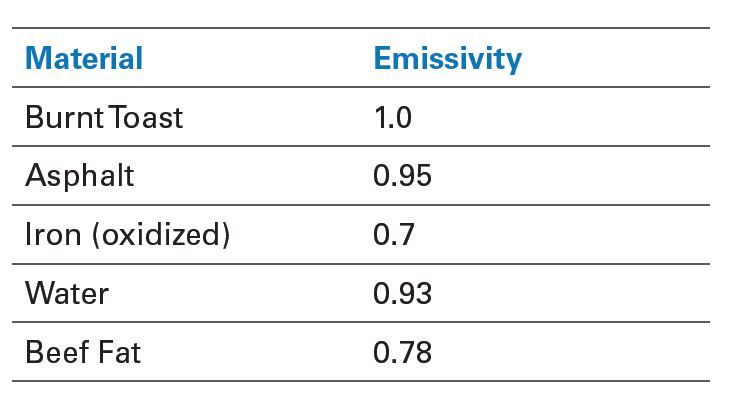
Emissivity table that provides an estimate of different materials, to measure the temperature...
The reflected apparent temperature (often abbreviated as Trefl) is also a measured value that is entered in the camera menu. As the name suggests, it is an apparent temperature, so measure it with the emissivity value set to 1.0. Next, place a reflective material next to the object in question and take an average temperature of the reflective material. Enter this value in the reflected temperature area of the camera menu and proceed to measure the object of interest.
For drone operators, what is most reflected in thermal images is the sky. In addition, the coldest thing in sight is usually the clear sky or a reflection of it. Incorrect Trefl compensation can lead to huge errors in temperature measurements of reflective materials. A common mistake is to confuse the apparent reflected temperature with the ambient temperature: they are not at all the same thing. For example, when measuring the temperature of solar panels, the Trefl could be as low as -40°C on a clear day, but the ambient temperature could be above 32 °C. Such a common error makes any temperature measurement - and the conclusions drawn from it - virtually useless, and potentially catastrophic.

Different roof materials with different emissivity significantly influence the thermal camera reading.
DETERMINES THE MINIMUM SIZE OF THE OBJECT TO BE MEASURED
Another consideration is what is called the measurement spot size of the camera. A thermal camera cannot accurately measure the temperature of a single pixel. Thermographers need a minimum of a four by four pixel square, but sometimes up to 10 by 10 pixels. In the case of drone inspections, to accurately measure temperature, you need to make sure that the drone is close enough to the target to place the camera's measurement point (that four-by-four pixel square) completely within the heat signature of the point requiring measurement.
Unfortunately, unlike handheld cameras, the most common drone thermal cameras in use do not provide a proper visual reference to do this. The point measurement tool is just a graph highlighting a single pixel, which - as mentioned above - will not give an accurate temperature measurement. Also, most thermal cameras only provide electronic zoom, which makes the individual pixels larger and does not provide additional resolution. The one exception to this is the FLIR Vue® TZ20-R, which provides operators with a 5x optical zoom to more easily capture images with adequate resolution to accurately measure temperature.
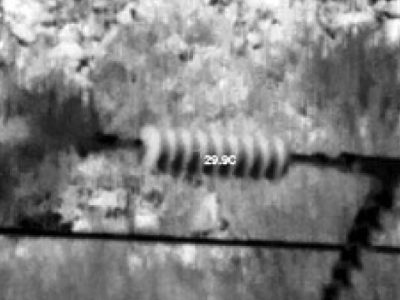
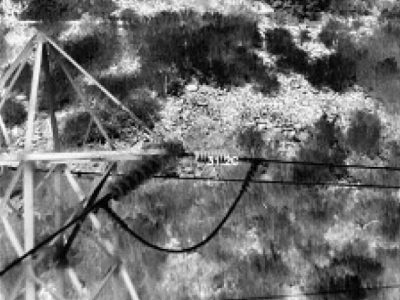
Adjust the position of the drone so that the measurement spot size matches the thermal signature.
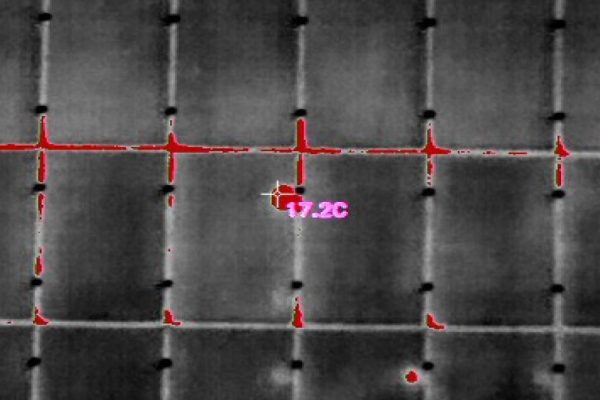
The size of the measuring point must be adjusted to the heat signature.
COMMON MISTAKES FOR THERMOGRAPHERS WITH DRONES
Drone thermographers often overlook the above points. The most basic is that they assume the temperature readings they see on the drone's display are accurate. 99% of the time, they are not even close. This is usually due to the combination of emissivity and reflected apparent temperature being left at their default values, when those values do not resemble the properties found in the field. The other could be that they are simply too far away from their object of interest to measure accurately - remember, a single pixel cannot be measured accurately.
But something so common is trying to provide quantitative data, with actual temperature values pretending to be accurate, when all that is required is a qualitative analysis. A perfect example of this is a roof inspection. The objective of a thermal roof inspection is to find thermal anomalies that may indicate the presence of trapped moisture under the roof membrane. This is an inherently qualitative inspection in most cases.

We hope this article has been useful for you to measure the temperature correctly.
If you want to know more about thermography and thermal imaging cameras, click on the following button.


